
Free Excel template · Reviewed
Payment tracking and reconciliation Excel template
Match each payment to an order and compare expected proceeds with the amount actually credited. The workbook includes a blank 100-row worksheet and a worked XOF example. No account required.
Your ready-to-use template
Macro-free .xlsx workbook. Separate inputs and formulas, with a fictional example. Original ZyndPay template v1: use and adaptation for your business are permitted.
Download the free Excel template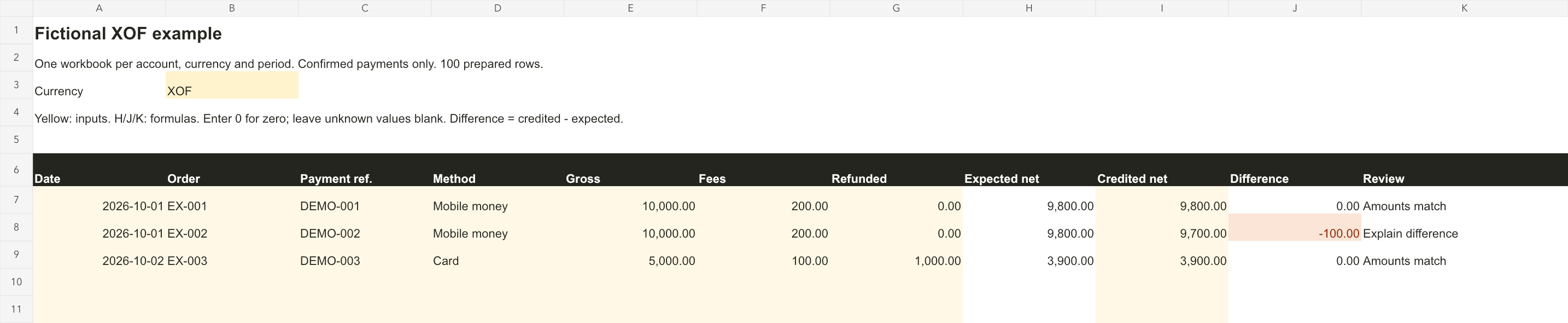
How to use it
- Download the workbook and open it in Excel or LibreOffice. You can also import it into Google Sheets. Keep a blank copy.
- Use one workbook per account, currency and period. Enter the currency in B3. Record confirmed payments from your statement or merchant workspace, with a unique reference per payment.
- Complete the yellow inputs: date, order, payment, method, gross amount, fees and refunds. Enter 0 for a zero amount. Column H calculates expected net proceeds.
- Enter the actual net credit attributable to this payment in column I. Leave an unknown amount blank, rather than treating it as zero. Do not repeat a bundled settlement across multiple rows.
- Review column J: credited net minus expected net. Investigate duplicate payment references. Explain differences before making corrections; never automatically pay the difference.
A worked example
Fictional example: a 10,000 XOF payment with 200 XOF in fees and no refund produces 9,800 XOF in expected proceeds. If the statement shows 9,700 XOF, the difference is -100 XOF. Investigate that difference before taking action.
Scope and limitations
This worksheet tracks individual payments. It does not reconstruct a complete bank balance or automatically allocate bundled settlements, reserves, holds or monthly charges. Keep XOF, XAF, EUR, USD and stablecoins separate. It does not replace your official statement or accounting records. Formulas cover 100 rows; duplicate the workbook for a new period.
This documentation distinguishes gross amounts, fees and net amounts in the settlement currency. It describes Stripe; our workbook is an original template with no Stripe connection or affiliation. Stripe: balance summary and itemized transactions
Move from manual tracking to a merchant workspace
When manual tracking becomes difficult, ZyndPay connects payments to order references and provides transaction history with CSV export. Payment methods depend on your account and market. You can keep using the template with other providers.
Frequently asked questions
Does the workbook import transactions automatically?
No. It works offline with values you enter. ZyndPay does not receive its contents.
Can I use it for Orange Money or Wave?
Yes, for manual tracking: copy confirmed payments, actual fees and net credits in the same currency. The workbook does not fetch statements or include operator tariffs.
Does a zero difference prove a payment is valid?
No. It only means the entered amounts agree. Confirm payment with the provider and investigate duplicate references separately.